How to set up your BPHOST email on your phone or desktop
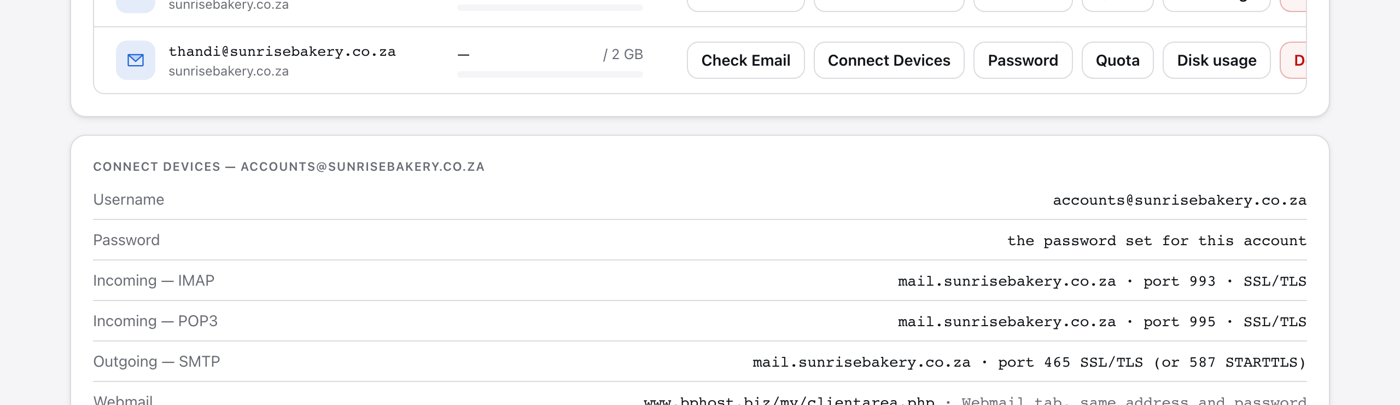
To send and receive your BPHOST email in an app like Outlook, Apple Mail, the Gmail app or your phone's Mail app, you need your mail server settings. CHPanel shows them under Connect Devices.
Your settings
- Username: your full email address (for example you@yourdomain.co.za)
- Password: your email password
- Incoming (IMAP): mail.yourdomain.co.za, port 993, SSL/TLS
- Incoming (POP3): mail.yourdomain.co.za, port 995, SSL/TLS
- Outgoing (SMTP): mail.yourdomain.co.za, port 465, SSL/TLS (or port 587 with STARTTLS)
Replace yourdomain.co.za with your own domain. We recommend IMAP rather than POP3, so your mail stays in sync across all your devices.
The easy way
- Sign in at https://chpanel.bphost.biz with your CHPanel login.
- Open the Email tab, then Email Accounts.
- Click Connect Devices next to the address. The exact settings for that mailbox are listed, ready to copy into your app.
Tips
Always pick the SSL/TLS options above so your email is encrypted. If your app shows a certificate warning, check that the server name is mail.yourdomain.co.za for both incoming and outgoing mail. If the hosting account belongs to someone else and you cannot see CHPanel, ask them for the settings — they are the same for every mailbox on the domain. Still stuck? Open a support ticket.