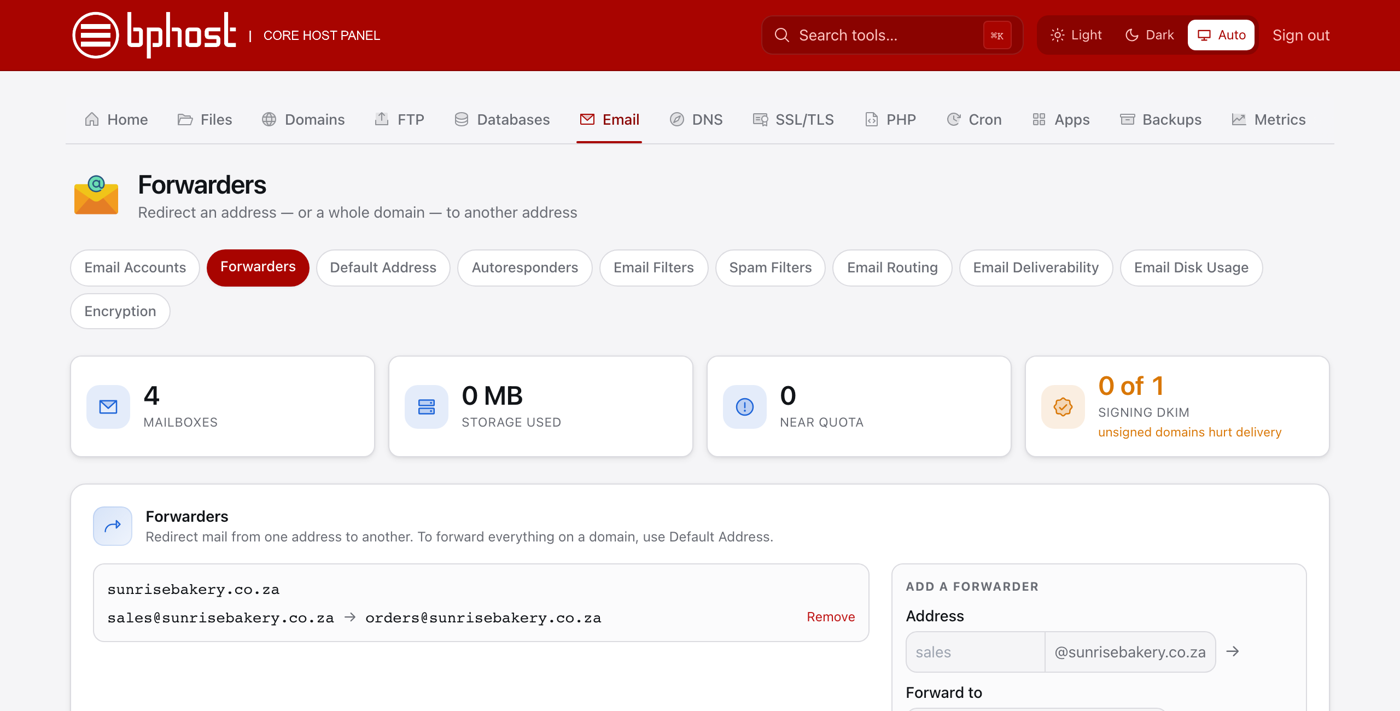
How to set up an email forwarder
A forwarder automatically sends email arriving at one address on to another — handy for routing info@yourdomain.co.za to your personal inbox or to a colleague.
Create a forwarder
- Sign in at https://chpanel.bphost.biz with the email address on your hosting account and your CHPanel password (both are in your welcome email).
- Click the Email tab, then Forwarders.
- Under Add a forwarder, type the part before the @ in Address (for example info) and pick the domain.
- In Forward to, enter the destination address — at your own domain or somewhere else entirely, such as a Gmail address.
- Click Add forwarder. It starts working straight away.
Good to know
- Existing forwarders are listed on the same page. Click Remove next to one to stop it.
- To forward every address at a domain, including ones that do not exist, use Default Address instead — see our catch-all guide.
- If the address also has a mailbox, keep checking that mailbox as well until you are sure the forward is doing what you expect.
Trouble?
If forwarded mail is not arriving, check the destination address for typos and look in that mailbox's Junk folder. For anything more involved, such as sending one address to several people, open a support ticket and we will set it up with you.