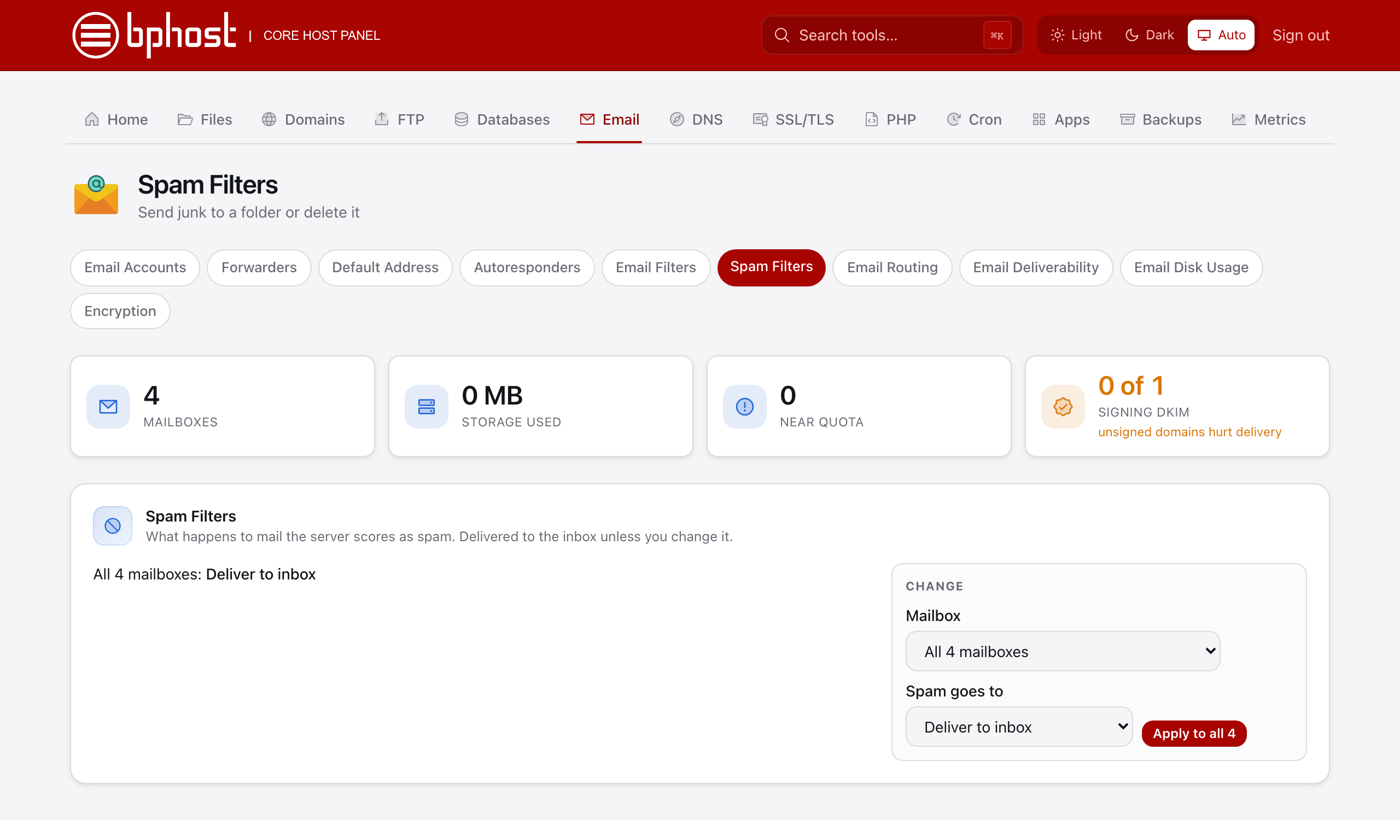
How to manage spam filters
BPHOST's mail server scores every incoming message for spam. The Spam Filters tool in CHPanel lets you decide what happens to messages it marks as spam — for one mailbox, or all of them at once.
Choose what happens to spam
- Sign in at https://chpanel.bphost.biz with the email address on your hosting account and your CHPanel password (both are in your welcome email).
- Click the Email tab, then Spam Filters.
- Pick a mailbox, or choose All mailboxes to set the same rule everywhere.
- Choose one of: Deliver to inbox (spam is delivered normally), move it to the Junk folder, or delete it.
- Save — or use Apply to all to copy the setting to every mailbox on the account.
Which option is best?
For most people the Junk folder is the safest choice: spam stays out of your inbox, but you can still rescue a real message that was scored wrongly. Only choose delete if you never want to see it — deleted spam cannot be recovered. Have a look in your Junk folder in webmail now and then.
Blocking or allowing a sender
CHPanel does not currently have a per-sender allow list or block list, and the spam score threshold is set by the server rather than per account. To block a persistent sender, use Email Filters on the Email tab: create a rule for that mailbox where From contains the sender's address and the action is delete or move to a folder. If a legitimate sender keeps landing in Junk, open a support ticket and we will look at why.