Moving from cPanel to CHPanel: what changed and where everything is
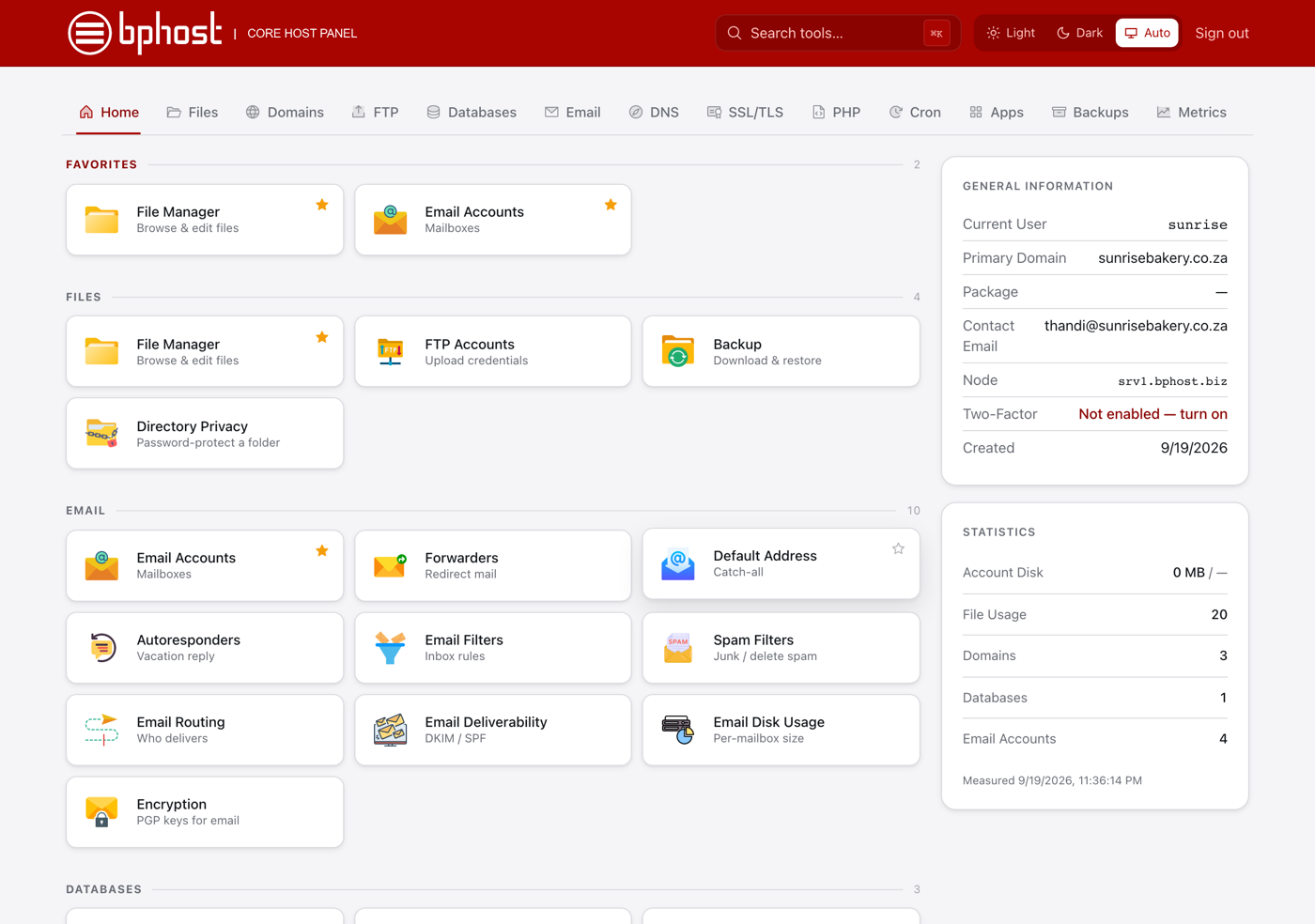
BPHOST hosting accounts now run on CHPanel (Core Host Panel), our own control panel, instead of cPanel. If you have used cPanel before you will feel at home within a minute: the tools have the same names, live in the same groups, and do the same jobs. This guide covers what has changed and where everything is.
1. Where to log in
- CHPanel is at chpanel.bphost.biz — one address for everyone. The old yourdomain.co.za/cpanel and :2083 addresses are gone.
- Sign in with the email address on your hosting account and your CHPanel password (both are in the welcome email we sent you). If you no longer have it, open a ticket and we will reset it.
- Your client area (invoices, domains, tickets) is a separate login with its own password. There is no “Login to cPanel” button any more — go straight to chpanel.bphost.biz.
2. Webmail has a new front door
Staff who only use email never need CHPanel. They sign in on the Webmail tab of the client-area login page with their email address and email password, or go directly to webmail.bphost.biz. The old yourdomain.co.za/webmail address is retired.
3. Where the cPanel tools went
In cPanel In CHPanel File Manager, FTP Accounts, Backup, Directory Privacy Files → same names. Backups are now automatic every night and kept for seven days. Email Accounts, Forwarders, Autoresponders, Default Address, Email Filters, Spam Filters, Email Routing, Email Deliverability, Email Disk Usage Email → same names. “Check Email” opens webmail without a password; “Connect Devices” shows your phone/Outlook settings. MySQL Databases, Database Wizard, Remote MySQL Databases → Manage Databases, Database Wizard, Remote Database Access. (phpMyAdmin is not included — ask us for imports and exports.) Domains, Subdomains, Addon Domains, Redirects, Zone Editor Domains and DNS → same names. Parked/alias domains: add as an addon domain or ask support. SSL/TLS, IP Blocker, Hotlink Protection, ModSecurity, Two-Factor Authentication Security → same names. Free Let’s Encrypt certificates with auto-renew. Softaculous, MultiPHP Manager, Optimize Website Software → App Installer (WordPress, Nextcloud, phpBB, static site), Select PHP Version, Optimize Website. Cron Jobs, Error Pages, Indexes, MIME Types, Apache Handlers, Bandwidth, Errors, Terminal Advanced and Metrics → same names. 4. What stayed exactly the same
- Your website files are still in public_html; addon domains and subdomains each have their own folder.
- Your email addresses, passwords and folders were moved as they were. Mail programs keep working with server mail.yourdomain.co.za (IMAP 993, POP3 995, SMTP 465 or 587).
- Database names and users kept their username_ prefix; the database host is still localhost.
5. Three handy things that are new
- Search tools at the top (or press Ctrl+K / ⌘K) jumps to any tool by name.
- Star a tile to keep it in your Favorites at the top of the home page.
- Light, Dark or Auto theme — your choice is remembered.
Trouble?
If a tool you relied on in cPanel is missing, or you cannot sign in, open a support ticket — tell us what you were trying to do and we will get you there.