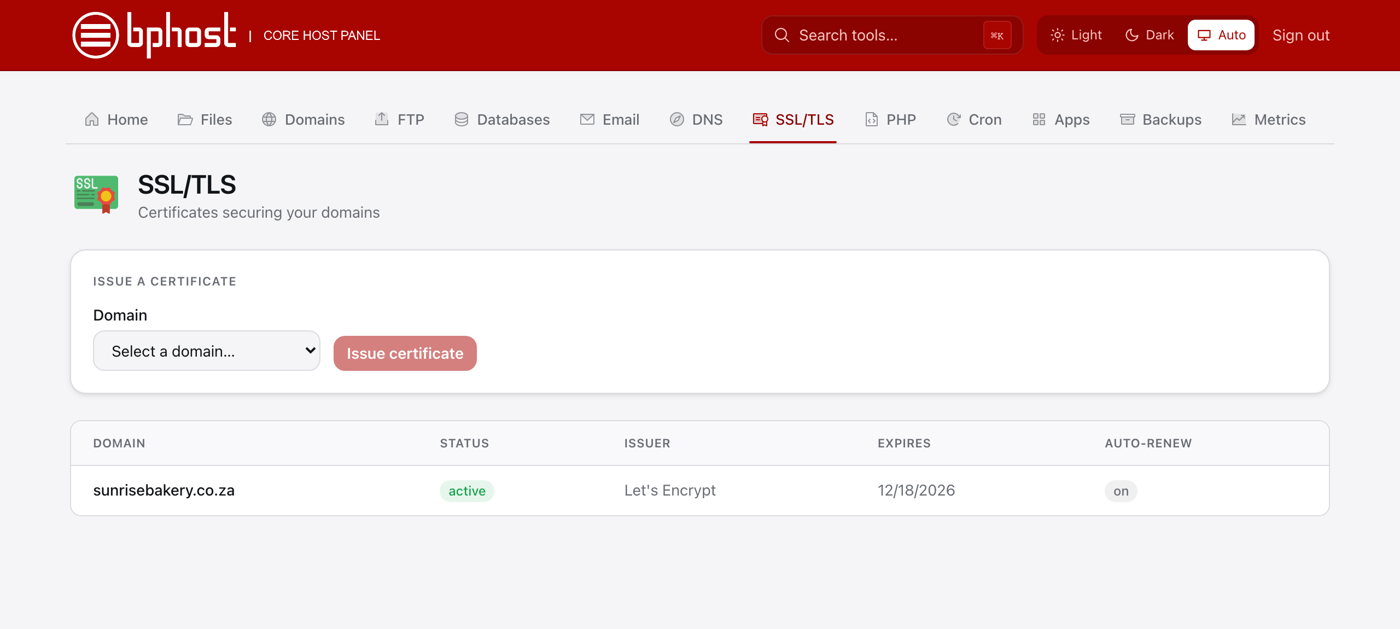
How SSL certificate renewal works in CHPanel
SSL certificates have an expiry date, but on BPHOST you never renew them by hand: CHPanel renews every Let's Encrypt certificate automatically, well before it runs out.
How Auto-renew works
- Sign in at chpanel.bphost.biz with your hosting account email address and CHPanel password, then open the SSL/TLS tab.
- Each certificate is listed with Status, Issuer, Expires and Auto-renew: on.
- That is all there is to it. As long as the domain keeps pointing at BPHOST, a fresh certificate is issued before the expiry date and visitors never see a warning.
If a certificate warning appears anyway
- Check DNS. Renewal fails when the domain no longer points at our server — for example after moving DNS to Cloudflare or another provider. Check the A record with your DNS provider, or in CHPanel's DNS → Zone Editor if we host your zone, and point it back at the server IP shown in CHPanel.
- Check the Expires date in SSL/TLS. If it has passed and DNS is now right, choose the domain under Issue a certificate and click Issue certificate to get a new one straight away.
- Check the address. The certificate covers your website name; a mail program should use mail.yourdomain.co.za, not the bare domain — see our common SSL errors guide.
Paid or third-party certificates
CHPanel issues Let's Encrypt certificates. If you have a certificate bought elsewhere that needs installing or renewing, open a support ticket and we will help.