How to block an IP address
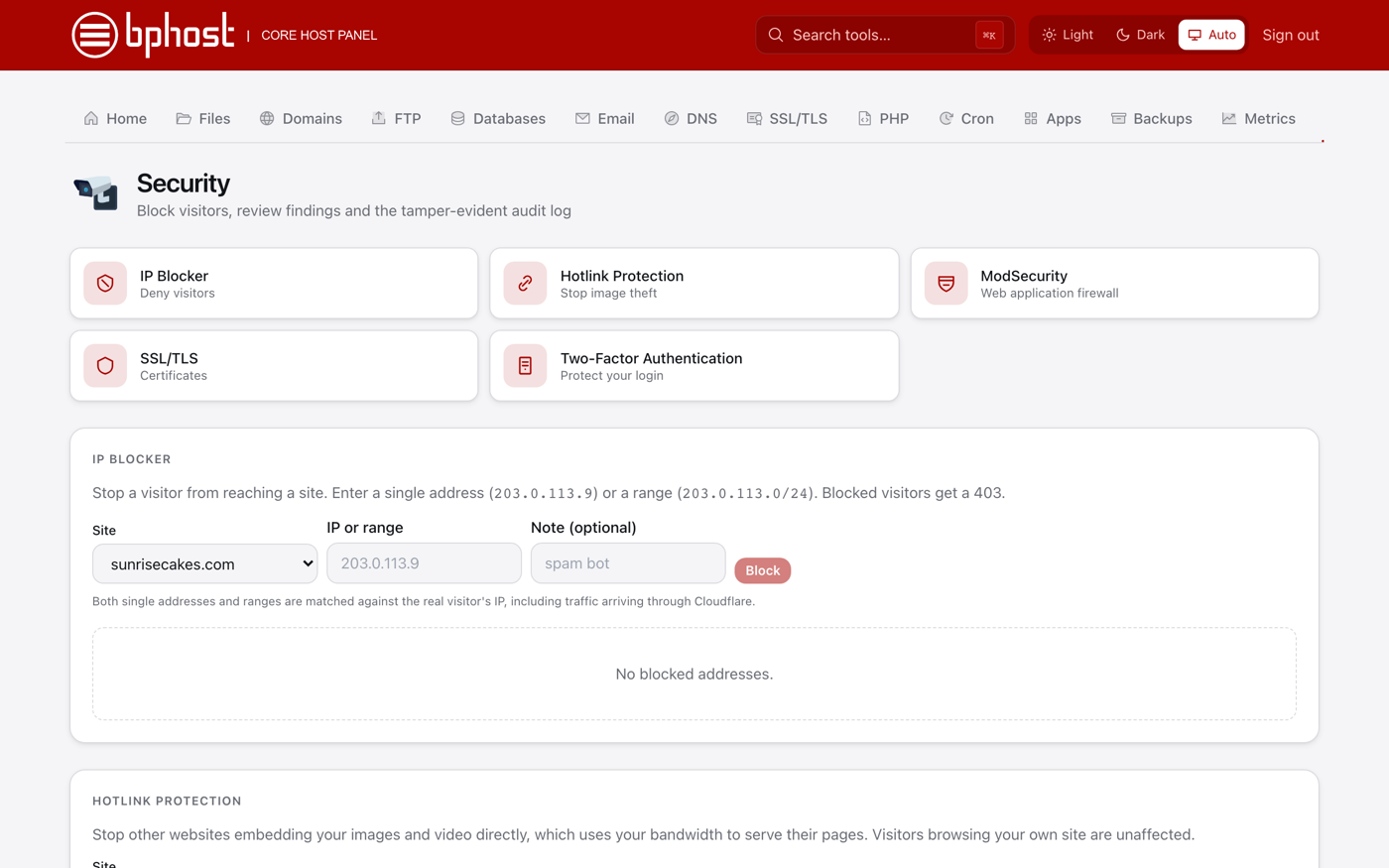
If a particular visitor or bot is causing trouble — spam, scraping or attacks — you can block their IP address from your site with CHPanel's IP Blocker. Blocked visitors get a 403 Forbidden page.
Block an IP in CHPanel
- Sign in at chpanel.bphost.biz with your hosting account email address and CHPanel password, then open Security → IP Blocker.
- Choose the Site the block applies to.
- Enter the IP or range: a single address like 203.0.113.4, or a whole range in CIDR form like 203.0.113.0/24.
- Add an optional Note so you remember why (e.g. "comment spam, Sept 2026").
- Click Block. The block takes effect straight away.
Finding the IP
The Errors tool (Home → Advanced) shows your site's recent error-log entries, and Metrics shows request and error counts over time. On WordPress, a security plugin such as Wordfence lists the addresses hammering your login page. Most spam and attacks come from a handful of addresses.
A word of caution
Never block your own address, and be careful with ranges — IP addresses are shared and change, so you can lock out legitimate visitors. For widespread abuse, turn on ModSecurity (also under Security), which filters common attack patterns for the whole site, or put a service like Cloudflare in front. Need help identifying an attacker? Open a support ticket.