How to change your PHP version
Different apps need different PHP versions. In CHPanel you choose the PHP version per website, and the change applies within seconds — no save button, no restart.
Select a PHP version
- Sign in at chpanel.bphost.biz with your hosting account email address and CHPanel password, then open the PHP tab (or the Select PHP Version tile under Software on the Home page).
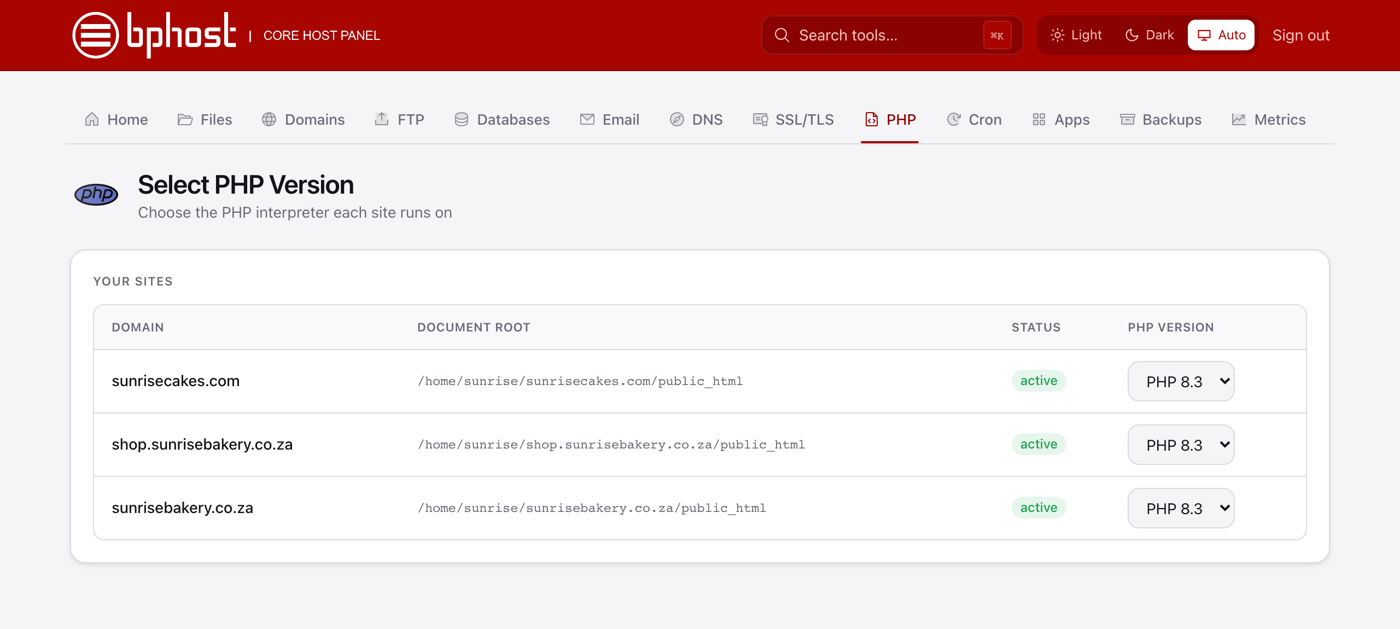
- You will see a table of your sites with Domain, Document root, Status and a PHP version dropdown for each.
- Find the site you want to change and pick the version from its dropdown — for example PHP 8.3, 8.2 or 8.1.
- Done. The new version is live within seconds; reload your site to check it. Addon domains and subdomains each have their own row, so they can run different versions.
Which version should I use?
Newer PHP (8.x) is faster and still receives security fixes, so use the newest version your site supports. Current WordPress, Nextcloud and phpBB run happily on PHP 8.2 or 8.3; an older script may need 8.1. If something breaks after a change, simply switch back.
Extensions and limits
There is no extension picker or PHP settings tab in CHPanel yet. To raise memory_limit or upload sizes, add a .user.ini file — see our guide on PHP memory and upload limits. If an app reports a missing PHP extension, open a support ticket with the extension name and we will check it for you.